

System Features & Interaction Guide
The Digital Persona (PDI) is a Persistent Digital Instance designed for immersive, low-latency, and emotionally intelligent interactions. This guide covers existing capabilities, how to interact with the system, and our future roadmap.
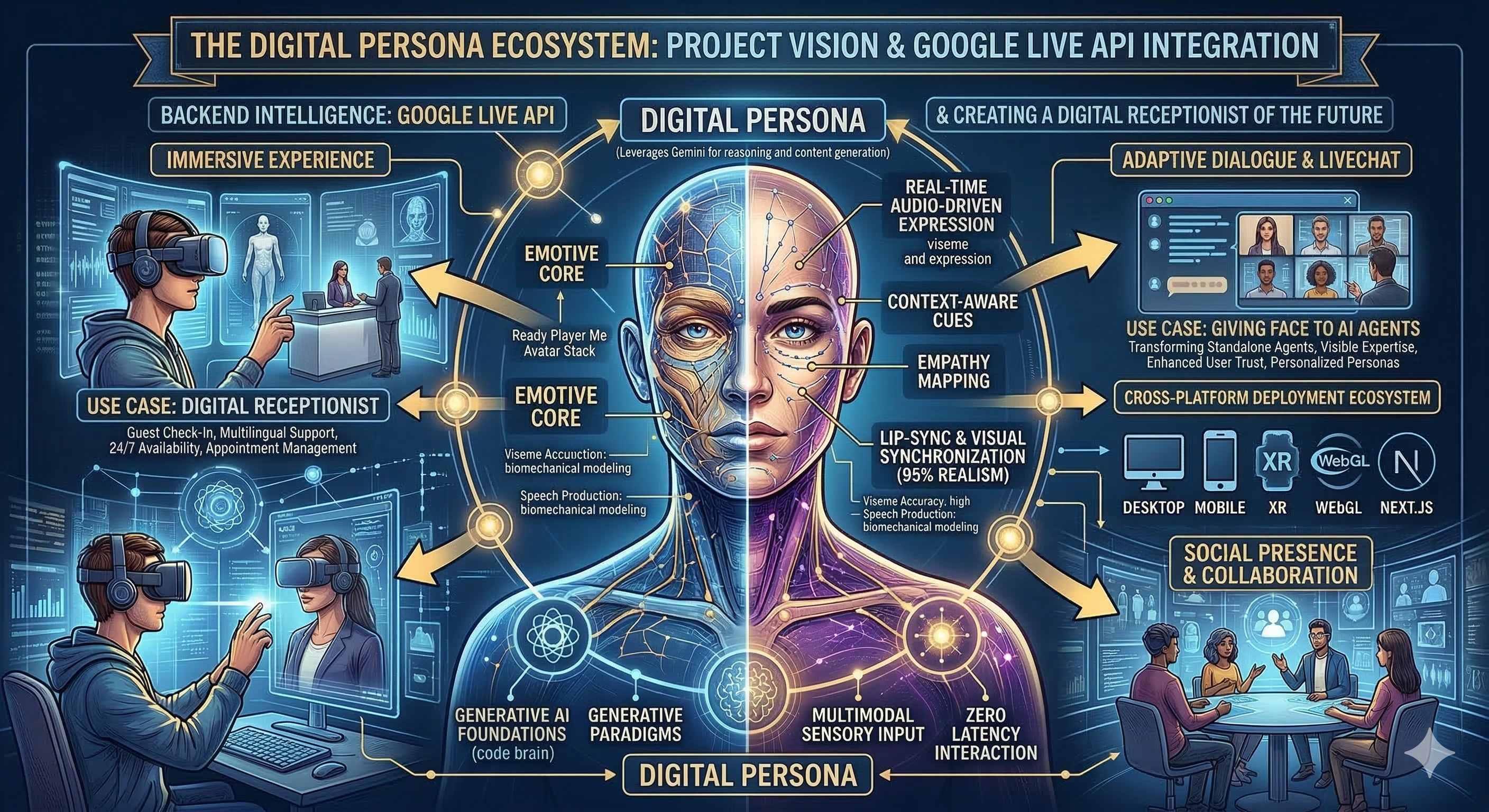
Core Intelligence & Audio
- Affective Dialog: By utilizing the
v1alphaLive API parameters, the system listens to your voice—not just your words. It detects frustration, joy, or hesitation and automatically adjusts its own spoken tone, pitch, and pace to empathize with you. - Proactive & Precise VAD: Advanced Voice Activity Detection filters out room noise, ensuring the AI only triggers when you are intentionally speaking to it. Precise
audioStreamEndsignaling ensures the model accurately understands when you have finished speaking or muted your microphone, preventing conversational lag. - Native Audio Processing: Unlike traditional bots that use slow TTS/STT steps, the Gemini 2.5 Flash model processes raw audio directly for near-instant (under 500ms) responses. Learn more in the Gemini Live API section.
- Bi-Lingual Fluidity: Seamlessly switch between English and Hindi/Haryanvi. The API's native multi-lingual support detects your language shift and responds in kind without requiring manual configuration changes.
Visual Grounding
- Environmental Awareness: The persona "sees" your room via the webcam. It can identify objects, notice if you move, or comment on your surroundings.
- Dynamic Mirroring: The system intelligently mirrors the front camera for a natural selfie-view and disables mirroring for the back camera to ensure accurate environment scanning.
Expression & Lip Sync
- Wawa Lip Sync: Neural-based viseme extraction ensures the avatar's mouth movements perfectly match the spoken syllables in real-time.
- ARKit Blendshapes: Support for 52+ standard ARKit blendshapes allows for complex, multi-layered facial expressions (smirks, eye-rolls, raised eyebrows). See Avatar Realism for details on skin and facial rendering.
Interaction Guide
Voice Commands (Direct AI Interaction)
The Digital Persona understands natural language and can execute system actions on your behalf using the Consolidated Toolset:
- "Flip the camera" / "Show me the room": Triggers the
switch_cameratool to swap between front and back lenses. - "Goodbye" / "Bye for now": Triggers the
end_calltool to gracefully terminate the session. - "Search for [topic]": Uses Google Search grounding to provide factual, real-time data.
- "Explain this code": Triggers the
display_texttool to show formatted code blocks in the side panel for easier reading.
UI Controls
- Glassmorphic Control Bar: Hover or tap the floating island at the bottom to toggle Microphone, Camera, Chat, and Session status.
- Interactive Feed: Click the "Flip" icon in the center of the control bar to manually swap camera lenses.
- Live Dual-Captions: The side panel provides real-time, API-generated text transcriptions of both your input and the model's output (
outputAudioTranscription), invaluable for accessibility or noisy environments. - Debug Mode: Use the "Debug" toggle to view underlying scene graphs, bone structures, and performance metrics. See the Technical Architecture for a deep dive into the 3D pipeline.
The Power of the Gemini Live API
The Digital Persona is driven by the state-of-the-art Gemini 2.5 Flash model via the Live API, fundamentally changing how AI interaction feels:
- True Multimodal Streaming: The system processes both high-quality audio and real-time video frames simultaneously. It doesn't just wait for you to speak; it observes your environment and listens to your tone.
- Ultra-Low Latency: Traditional voice agents rely on a slow "Speech-to-Text → LLM → Text-to-Speech" pipeline. By processing native audio directly, our system achieves near-instant response times for fluid, human-like conversational pacing.
- Real-Time Function Calling: The Live API architecture allows the model to trigger client-side tools (like flipping cameras, evaluating code, or retrieving live web data) seamlessly without breaking the conversational rhythm.
Dive deeper into our bidirectional streaming architecture: Gemini Live API & Audio SDK →
Future Roadmap
Phase 1: Contextual Memory
- Long-term Persona Memory: The AI will remember your name, past preferences, and shared history across multiple sessions.
- Spatial Object Persistent: Ability to "remember" where you placed objects in the room even if the camera moves.
Phase 2: Collaboration & Versatility
- Multi-Avatar Integration: Support for VCI/VRM standards to swap your 3D avatar instantly.
- Collaborative Whiteboard: The AI will be able to draw diagrams or code alongside you on a shared spatial canvas.
Phase 3: Total Embodiment
- Physics-Aware Interaction: The avatar will react to physical contact (if using a touchscreen or VR) and have weight/mass in the 3D scene.
- Cross-Platform PDI: Sync your digital persona across Web, Mobile, and VR/AR headsets with a unified intelligence.
Deep Dives
Explore the tech that makes the face move: Avatar Realism & Lip Sync →
Understand the multimodal delivery pipeline: Gemini Live API & Audio SDK →
Review the technical blueprint: Architecture & Cloud Strategy →